When you reach CCIE-level interviews, basic answers won’t be enough. You must be able to explain the full picture — protocol design, headers, options, timers, and behaviors under load. Below are detailed answers, written in a natural speaking flow so you can read, memorize, and confidently deliver them in interviews.
1) What is TCP?
TCP, or Transmission Control Protocol, is a core transport layer protocol defined in RFC 793, later enhanced by RFCs like 2018 (SACK), 7323 (timestamps & window scaling), and 7413 (Fast Open). It’s a connection-oriented and reliable protocol, meaning it establishes a session before transmitting data and guarantees delivery.
Here’s the flow:
TCP is connection-oriented because it uses the 3-way handshake (SYN → SYN/ACK → ACK) to synchronize sequence numbers and establish a virtual session before sending data. It’s reliable because every byte transmitted is tracked with sequence numbers and confirmed by acknowledgments. If data is lost, corrupted, or arrives out of order, TCP will retransmit it.
Another key property is that TCP provides a byte-stream service. Applications send data to TCP as a continuous stream, and TCP breaks it into manageable segments. At the receiver, TCP reassembles the stream so the application sees it in the correct order, even if packets arrived out of sequence.
TCP also implements flow control using sliding windows, ensuring the sender never overwhelms the receiver. On top of this, it implements congestion control algorithms like Slow Start, Congestion Avoidance, Fast Retransmit, and Fast Recovery, so it adapts to network capacity.
Real-world: Every time you open a secure website (HTTPS), your browser initiates a TCP connection to the server, negotiates encryption (TLS), and then exchanges HTTP data over TCP. TCP ensures that every byte of the web page arrives in sequence, error-free, and without duplication.
2) What is UDP?
UDP, or User Datagram Protocol, is defined in RFC 768. It’s a connectionless transport layer protocol. That means it doesn’t establish a session before sending data, and it doesn’t track whether the data arrived successfully.
Unlike TCP, UDP does not use sequence numbers, acknowledgments, retransmissions, or sliding windows. Each UDP datagram is independent. Because of this, UDP has a very small header (just 8 bytes: source port, destination port, length, and checksum).
Now, why would we use UDP if it’s unreliable? The answer is speed and simplicity. UDP is much faster because there’s no handshake or retransmission overhead. It’s ideal for real-time applications where speed matters more than reliability — things like DNS queries, DHCP, VoIP, live streaming, and gaming. For example, in VoIP, if a voice packet is lost, retransmitting it later doesn’t help — it’s better to drop it and move on to the next one.
UDP also supports multicast and broadcast, which TCP cannot do natively. This makes it very useful for service discovery and streaming to multiple clients.
3) Explain the TCP Header in detail.
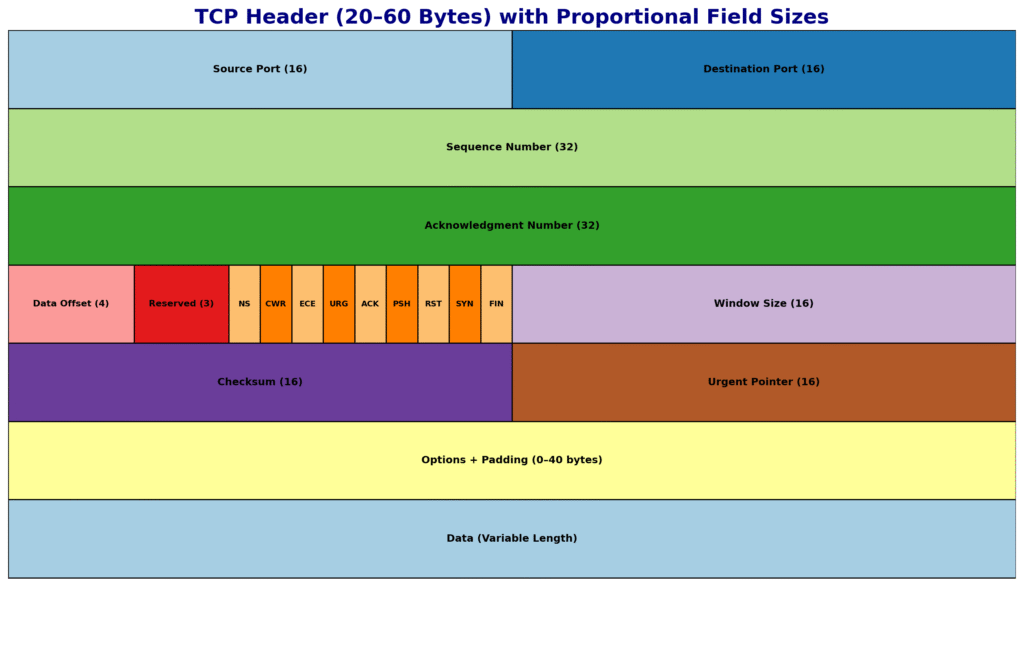
The TCP header is 20 bytes minimum and can grow up to 60 bytes with options. Each field plays a role in making TCP reliable and robust. Let’s walk through them in order:
- Source Port (16 bits) and Destination Port (16 bits): Identify the sending and receiving applications. For example, HTTP typically uses destination port 80, HTTPS uses 443.
- Sequence Number (32 bits): Tells the receiver the position of the first byte of data in this segment. This is how TCP reorders data if it arrives out of sequence.
- Acknowledgment Number (32 bits): Used when the ACK flag is set. It indicates the next byte the receiver expects, confirming all data before it has been received.
- Data Offset (4 bits): Also called header length. Tells how long the header is in 32-bit words, so the receiver knows where the data begins.
- Reserved (3 bits): Always set to zero. Kept for future use.
- Flags (9 bits total): These are control bits — SYN, ACK, FIN, RST, PSH, URG, and the ECN-related flags (ECE, CWR, NS). They control session setup, teardown, error handling, and data delivery.
- Window Size (16 bits): The number of bytes the receiver is willing to accept, used for flow control.
- Checksum (16 bits): Covers both the TCP header and data, plus a pseudo-header from the IP layer, ensuring integrity.
- Urgent Pointer (16 bits): If URG is set, this points to the last urgent byte. Used for legacy urgent data signaling.
- Options (0–40 bytes): Extend TCP functionality. Common options include MSS (Maximum Segment Size), Window Scaling, Selective Acknowledgment (SACK), and Timestamps.
In interviews, don’t just list fields. Explain why each exists — for example, sequence and acknowledgment numbers are the foundation of reliability, checksum protects against corruption, and options allow TCP to scale to modern gigabit-speed networks.
4) What are TCP Flags and their Hexadecimal Values?
TCP flags are 1-bit control signals inside the header. They define the state of a connection and how TCP behaves. At CCIE level, you must know not only what each flag does, but also its hexadecimal value.
- FIN (0x01): Finish. Gracefully closes a connection when a host has no more data to send.
- SYN (0x02): Synchronize. Used to establish a connection and exchange initial sequence numbers.
- RST (0x04): Reset. Immediately terminates a connection — used when a segment arrives for a closed port or in error situations.
- PSH (0x08): Push. Instructs the receiver to pass data to the application immediately, without waiting to fill buffers.
- ACK (0x10): Acknowledgment. Confirms that the acknowledgment number field is valid. Almost every TCP segment after the handshake carries this flag.
- URG (0x20): Urgent. Indicates that some data should be prioritized, and the urgent pointer field is valid.
- ECE (0x40): ECN Echo. Used with Explicit Congestion Notification to indicate congestion was experienced.
- CWR (0x80): Congestion Window Reduced. Sent by the sender after reducing its congestion window in response to ECN.
- NS (0x100): Nonce Sum. An experimental flag used for additional ECN protection.
Examples in practice:
- SYN (0x02) → Sent to initiate a connection.
- SYN+ACK (0x12) → Server reply in handshake.
- FIN+ACK (0x11) → Graceful close.
- RST+ACK (0x14) → Connection reset.
When you’re in an interview, it helps to say: “Every TCP session begins with SYN, SYN-ACK, ACK and often ends with FIN, ACK, FIN, ACK. If something goes wrong, RST is used instead of FIN.”
5) What is the difference between FIN and RST?
This is a classic interview question, and at CCIE level you must answer it in depth.
- FIN (Finish): Used for graceful termination. It means: “I have no more data to send, but I’m still ready to receive yours.” When one side sends a FIN, the session remains half-open until the other side also sends a FIN and both FINs are acknowledged. This is why we call it a 4-way handshake for termination. It ensures all outstanding data is transmitted before the connection closes.
- RST (Reset): Used for abrupt termination. It means: “Something is wrong, close this connection immediately.” No outstanding data is delivered; buffers are flushed. RST is sent if a packet arrives for a closed port, if a connection is refused, or if a firewall/policy explicitly blocks a session.
Real-world examples:
- FIN is seen when you close a browser tab and TCP ends normally.
- RST appears if you telnet to a port that’s closed, or when intrusion prevention/firewalls drop a session mid-flow.
In interviews, add: “FIN is polite, RST is harsh. FIN allows a session to end cleanly, RST is like slamming the door immediately.”
6) What is the difference between URG and PSH?
The URG flag and the PSH flag are often confused, but they serve very different purposes.
- URG (Urgent): When the URG flag is set, it tells TCP that there is urgent data inside this segment. The Urgent Pointer field specifies up to which byte in the stream this urgent data ends. Historically, this was used in Telnet sessions — for example, pressing Ctrl+C would send an interrupt as urgent data, so the server would stop processing other data and handle it immediately. Today, URG is rarely used in modern applications, but it’s still part of the protocol.
- PSH (Push): The PSH flag is about immediate delivery of buffered data. Normally, TCP may buffer data and wait to accumulate more before sending it to the application. With PSH set, TCP tells the receiver: “Push this data up to the application right away, don’t wait.” This is useful in interactive applications like SSH or remote shells, where every keystroke must be delivered instantly.
So the difference is:
- URG = prioritize specific urgent bytes (with pointer).
- PSH = push current buffered data without waiting.
👉 In interviews, you can say: “URG affects how TCP handles data internally in the stream, PSH affects how data is delivered to the application immediately.”
7) What are the TCP option fields? Define MSS, Timestamp, SACK, and Window Scale.
The TCP header can include options up to 40 bytes, which extend its functionality. These options are critical for performance in modern networks. Let’s break them down:
- MSS (Maximum Segment Size): This tells the maximum amount of TCP data (payload, not including headers) that a device can receive in one segment. It prevents fragmentation. For example, on Ethernet with MTU 1500, the MSS is usually 1460 (1500 – 20 IP header – 20 TCP header). If MSS negotiation didn’t exist, senders might transmit segments too large, leading to fragmentation and poor performance.
- Window Scale (RFC 7323): The Window Size field in the TCP header is only 16 bits, which limits it to 65,535 bytes. This was fine for early networks, but not for high-speed, high-latency links (like gigabit WAN). Window Scaling allows the window to be shifted left by up to 14 bits, effectively making the max window size about 1 GB. Without this, TCP throughput would collapse on long fat networks (LFNs).
- Timestamps (RFC 7323): This option allows each side to include a timestamp in segments. It is used for two purposes:
- RTT Measurement: More accurate round-trip time, so retransmission timeouts can be fine-tuned.
- PAWS (Protection Against Wrapped Sequence numbers): Sequence numbers are 32-bit and can wrap on high-speed links; timestamps help detect duplicates.
- SACK (Selective Acknowledgment, RFC 2018): Normally, TCP ACKs only the last contiguous byte received. If packets 1–1000 arrive, but 500–600 is missing, standard ACK would only confirm 1–499. With SACK, the receiver can say: “I got 1–499 and 601–1000, but I’m missing 500–600.” This prevents the sender from retransmitting data that was already received.
Other options include NOP (No Operation, padding) and newer experimental ones like TCP Fast Open cookies.
👉 In interviews, you should say: “Options like MSS, Window Scaling, Timestamps, and SACK are essential for TCP’s performance on modern high-speed networks. Without them, TCP would struggle in today’s internet.”
8) What is the role of the Urgent flag and Urgent pointer?
The URG flag indicates that the segment contains urgent data. The Urgent Pointer field (16 bits) tells where the urgent data ends in the stream. Together, they allow applications to mark certain bytes as needing priority handling.
For example, in Telnet, if a user presses Ctrl+C, the data is sent with the URG flag set and the pointer marking that single byte. The receiving TCP stack knows this data must be delivered immediately to the application, regardless of buffered data.
In modern use, URG and the pointer are rarely used. Applications like SSH and HTTP handle priority at the application level, not with TCP flags. However, at CCIE level, you must still understand them, because packet captures may still show URG set, and examiners may test your knowledge.
👉 Interview tip: “The Urgent flag and pointer were historically important for interactive applications like Telnet, but today they’re mostly legacy. Still, TCP supports them, and they must be understood at protocol level.”
9) What is Active Open and Passive Open?
TCP supports two ways of opening connections: Active Open and Passive Open.
- Active Open: When a client initiates a connection by sending a SYN, it is performing an Active Open. The client chooses a random ephemeral port and specifies the destination port (e.g., 443 for HTTPS).
- Passive Open: When a server listens on a port (LISTEN state) and waits for incoming connections, it is performing a Passive Open. When it receives a SYN, it replies with SYN-ACK, completing the handshake.
This distinction underpins the client-server model in TCP/IP. Clients usually perform Active Opens, while servers perform Passive Opens. However, TCP does allow unusual scenarios like Simultaneous Open, where both sides send SYNs at the same time — still valid, though rare.
👉 In interviews: “TCP supports Active and Passive Open to implement client-server architecture. Active is initiated by the client, Passive by the server.”
10) What is a Transmission Control Block (TCB)?
The Transmission Control Block (TCB) is the data structure that TCP maintains for every active connection. Think of it as the “control book” that stores everything TCP needs to manage reliability.
A TCB includes:
- Local IP and port.
- Remote IP and port.
- Current state of the connection (LISTEN, SYN-SENT, ESTABLISHED, FIN-WAIT, TIME-WAIT, etc.).
- Sequence numbers: last sent, last acknowledged, next expected.
- Acknowledgment numbers.
- Send and receive window sizes, including scaling factors.
- Retransmission timers and backoff values.
- Congestion control variables (cwnd, ssthresh).
- Pointers to buffers holding unacknowledged or out-of-order data.
When a TCP connection is established, the TCB is created. It lives in memory as long as the session is active, and is destroyed when the session closes.
👉 In interviews, you can phrase it like this: “The Transmission Control Block is the in-memory record that TCP maintains for each session, storing state, sequence numbers, windows, timers, and congestion variables. Without the TCB, TCP would not be able to provide reliable, stateful communication.”
11) What is Simultaneous Open and Simultaneous Close?
Normally, TCP connections follow the client-server model: the client actively opens a session with SYN, and the server passively listens and responds. But TCP is flexible enough to handle edge cases like Simultaneous Open and Simultaneous Close.
- Simultaneous Open: This occurs when both endpoints send SYN packets to each other at the same time, without knowing the other side is also trying to establish a connection. TCP handles this by allowing both SYNs, then each side replies with a SYN/ACK, and finally, both send ACKs. The connection is valid and both enter the ESTABLISHED state. While rare in practice, this scenario proves TCP’s robustness and is sometimes tested in CCIE-level interviews.
- Simultaneous Close: This occurs when both endpoints send FIN packets nearly simultaneously, indicating both want to close the connection at the same time. TCP handles this by ensuring both sides ACK each other’s FINs. The session then goes through the normal state transitions (FIN-WAIT, CLOSE-WAIT) and ends cleanly. Again, it’s uncommon, but TCP explicitly supports it.
👉 Interview flow: “TCP supports simultaneous open and simultaneous close. In simultaneous open, both sides send SYNs at the same time, and TCP still establishes a valid session. In simultaneous close, both sides send FINs almost together, and both ACK each other to close gracefully. These cases are rare in real networks but are valid in the TCP specification.”
12) Explain the TCP 3-Way Handshake and 4-Way Handshake.
The 3-way handshake is how TCP establishes a connection:
- SYN: The client sends a SYN with its Initial Sequence Number (ISN).
- SYN-ACK: The server replies with its own SYN, along with an ACK acknowledging the client’s ISN.
- ACK: The client replies with an ACK acknowledging the server’s ISN.
At this point, both sides have exchanged ISNs, synchronized sequence numbers, and the connection is ESTABLISHED.
The 4-way handshake is how TCP terminates a connection gracefully:
- One side sends a FIN, meaning “I have no more data to send.”
- The other side replies with ACK. The connection is now half-closed — one side can still send.
- The second side eventually sends its own FIN.
- The first side replies with ACK.
This ensures both sides finish sending before closing.
👉 Interview delivery: “The 3-way handshake establishes connections by exchanging SYN and ACKs, synchronizing sequence numbers. The 4-way handshake closes connections gracefully, ensuring both sides acknowledge each other’s closure. If closure needs to be abrupt, RST is used instead.”
13) What is Maximum Segment Lifetime (MSL)?
The Maximum Segment Lifetime (MSL) is the maximum time a TCP segment can exist in the network before being discarded. RFC 793 suggests 120 seconds as a typical MSL.
Why is this important? Because TCP must avoid confusion between old duplicate segments and new ones. This is why after closing a connection, the side that closed last enters TIME-WAIT state for 2 × MSL. This ensures:
- All duplicate segments have expired in the network.
- The final ACK is reliably received by the other side.
So if MSL is 120 seconds, TIME-WAIT is 240 seconds. That’s why when you do netstat, you often see many sockets in TIME-WAIT. It’s not a bug; it’s a deliberate design to protect against old data interfering with new connections.
👉 Interview phrase: “MSL is the maximum life of a TCP segment in the network, usually 120 seconds. TIME-WAIT lasts 2 × MSL to flush duplicates and ensure safe closure.”
14) What is Sliding Window in TCP?
The sliding window is TCP’s flow control mechanism, ensuring efficient use of bandwidth without overwhelming the receiver.
Here’s how it works: The receiver advertises a window size in each TCP header — the number of bytes it can accept without acknowledgment. The sender is allowed to transmit up to that many bytes without waiting for ACKs. As ACKs arrive, the window “slides” forward, allowing the sender to transmit more data.
Example: If the window size is 10,000 bytes and the sender transmits 10,000, it must pause until ACKs come back. If the receiver ACKs the first 2,000, the sender can now transmit another 2,000. The window continuously slides forward, which is why throughput is smooth.
This is much better than a stop-and-wait system, because multiple packets can be in transit at once, maximizing bandwidth usage.
👉 Interview tip: “Sliding Window lets the sender transmit multiple unacknowledged segments up to the receiver’s advertised window size. As ACKs arrive, the window slides forward, enabling continuous data flow.”
15) What is Windowing in TCP?
Windowing is related to sliding window but emphasizes how the receiver controls the sender’s transmission rate.
Every ACK a receiver sends includes the Window Size field, which tells the sender how much data it can accept. If the receiver is overloaded, it advertises a smaller window. If its buffer is empty, it can advertise a larger one. If the buffer is completely full, it can advertise a zero window, telling the sender to pause.
The sender must honor this window size. If the window is zero, the sender starts a persist timer and occasionally probes with 1-byte packets to check if the window has reopened.
In high-speed networks, the 16-bit window (65,535 bytes max) is too small, which is why Window Scaling (RFC 7323) was introduced, extending it to about 1 GB.
👉 Interview delivery: “Windowing is TCP’s mechanism for flow control — the receiver advertises how much it can handle, and the sender must adjust accordingly. Together with sliding window, it ensures smooth data transfer without overwhelming the receiver.”
16) How does TCP control errors?
TCP provides end-to-end error control, making it reliable. There are multiple mechanisms working together:
- Checksum: Each TCP segment includes a 16-bit checksum that covers the header, data, and a pseudo-header from the IP layer. When the segment arrives, the receiver recalculates the checksum. If it doesn’t match, the segment is discarded.
- Sequence Numbers: TCP assigns every byte a sequence number. If segments arrive out of order, the receiver can reorder them using these numbers. If a segment is missing, the sequence number gap will reveal it.
- Acknowledgments (ACKs): TCP uses positive acknowledgment. The receiver tells the sender the next expected byte. Anything below that is assumed received successfully.
- Retransmission Timers: If an ACK doesn’t arrive within the retransmission timeout (RTO), TCP retransmits the data. The RTO dynamically adapts based on measured RTT and variance.
- Duplicate ACKs + Fast Retransmit: If three duplicate ACKs are received, the sender retransmits the missing segment immediately without waiting for the timer. This speeds up recovery.
- Selective Acknowledgment (SACK): With SACK, the receiver can tell the sender exactly which blocks were received, so only the missing blocks are retransmitted.
👉 Interview delivery: “TCP ensures reliability with checksums for corruption detection, sequence numbers for ordering, acknowledgments for delivery confirmation, retransmission timers for lost packets, and advanced features like Fast Retransmit and SACK for efficient recovery.”
17) How does flow control take place in TCP?
Flow control ensures the sender doesn’t overwhelm the receiver. It’s done using the Window Size field in the TCP header.
The receiver advertises how many bytes it can accept in the window size field of every ACK. The sender must respect this limit. For example, if the receiver advertises a 10,000-byte window, the sender cannot send more than 10,000 unacknowledged bytes.
If the receiver’s buffer is full, it can advertise a zero window, telling the sender to stop. The sender then enters persist mode: it periodically probes with 1-byte packets to check if the window has reopened.
This mechanism ensures that even if the sender is faster than the receiver, data is transmitted at a safe rate without dropping packets in the receiver’s buffer.
👉 Interview delivery: “TCP flow control is receiver-driven. The receiver advertises a window size, and the sender must stay within it. If the window is zero, the sender pauses and probes periodically until the window opens again.”
18) Other than window size, what else can be used for flow control in TCP?
Besides flow control (receiver-based), TCP also implements congestion control (network-based) to prevent overloading the network itself. This is just as important.
Key congestion control algorithms:
- Slow Start: At the beginning, TCP doesn’t know the available bandwidth. It starts with a congestion window (cwnd) of 1 MSS and doubles every RTT. This exponential growth continues until packet loss occurs or a threshold is reached.
- Congestion Avoidance: Once threshold is reached, cwnd increases linearly instead of exponentially, to avoid flooding the network.
- Fast Retransmit: If three duplicate ACKs are received, the sender immediately retransmits the missing segment.
- Fast Recovery: Instead of dropping cwnd drastically, TCP reduces it moderately and continues in congestion avoidance, avoiding a complete restart.
- ECN (Explicit Congestion Notification): With ECE and CWR flags, routers can signal congestion before dropping packets.
So while window size prevents overwhelming the receiver, congestion control prevents overwhelming the network path.
👉 Interview delivery: “TCP not only uses advertised window size for flow control but also congestion control algorithms like Slow Start, Congestion Avoidance, Fast Retransmit, and ECN to adapt to network conditions.”
19) What is the difference between TCP and UDP?
This is a fundamental question, but at CCIE-level you must go beyond basics.
- TCP:
- Connection-oriented (3-way handshake).
- Reliable (retransmissions, acknowledgments, sequence numbers).
- Ordered delivery.
- Flow control and congestion control.
- Larger header (20–60 bytes).
- Use cases: HTTP/HTTPS, FTP, SMTP, SSH, Telnet — where accuracy matters.
- UDP:
- Connectionless (no handshake).
- Unreliable (no retransmissions or acknowledgments).
- No ordering guarantee.
- No congestion or flow control (application must handle).
- Small header (8 bytes).
- Use cases: DNS, DHCP, VoIP, video streaming, online gaming — where speed matters more than reliability.
👉 Interview delivery: “TCP is reliable, ordered, connection-oriented, and heavy. UDP is unreliable, unordered, connectionless, and light. TCP is used when accuracy is critical, UDP is used when speed and low latency are critical.”
20) Explain TCP Slow Start and TCP Fast Open.
These are advanced features of TCP.
- TCP Slow Start: When a new connection begins, TCP doesn’t know the available bandwidth. So it starts with a small congestion window (cwnd = 1 MSS). For every ACK received, cwnd doubles. This exponential growth continues until it reaches a threshold (ssthresh). Beyond that, it grows linearly (Congestion Avoidance). If loss occurs, cwnd shrinks and the process restarts. This protects the network from being flooded by new connections.
- TCP Fast Open (RFC 7413): This is a modern optimization. Normally, a 3-way handshake requires one RTT before data can flow. With Fast Open, the client can include application data in the SYN packet if it already has a cookie from a previous connection. The server can process this immediately, saving one RTT. This is especially valuable in HTTPS where many short connections are opened.
👉 Interview delivery: “Slow Start is a congestion control algorithm where cwnd grows exponentially until threshold, then linearly. Fast Open allows sending data in the first SYN using a cookie, reducing latency by one RTT.”