

When preparing for network engineer interviews, it’s important to explain fundamental concepts clearly and in a structured way. Below are detailed answers to some of the most commonly asked questions, written in a natural flow so you can study, remember, and deliver them confidently.
1) Explain the OSI Model.
The OSI model, or Open Systems Interconnection model, is a seven-layer framework that standardizes how data is transmitted across a network. Each layer has its own function. The Physical layer deals with cables, signals, and hardware. The Data Link layer uses MAC addresses and switches, adds framing, and detects errors. The Network layer provides logical addressing with IP and handles routing. The Transport layer ensures reliable or best-effort delivery using TCP or UDP. The Session layer establishes and manages sessions between applications. The Presentation layer translates data formats, compresses, and encrypts/decrypts information. Finally, the Application layer provides services directly to users like HTTP, DNS, and SMTP. The OSI model helps us understand, design, and troubleshoot networks by breaking communication into layers.
2) Explain the TCP/IP Model.
The TCP/IP model is a four-layer practical model that reflects how real-world networks, including the Internet, actually work. The Network Access layer covers physical and data link functions such as Ethernet and MAC addressing. The Internet layer handles IP addressing and routing across networks. The Transport layer uses TCP for reliable communication or UDP for faster, connectionless communication. Finally, the Application layer covers all application-level protocols like HTTP, FTP, DNS, and SMTP. TCP/IP is simpler than the OSI model and directly maps to actual protocols.
3) What is the difference between OSI and TCP/IP models?
The OSI model is a theoretical reference model with seven layers, while the TCP/IP model is a practical implementation model with four layers. In OSI, each function is more granular—for example, it has separate Presentation and Session layers, which TCP/IP does not. TCP/IP merges these functions into the Application layer. OSI is used for teaching and standardization, while TCP/IP is the model that governs real-world internet communication. In short, OSI explains how communication should work, while TCP/IP shows how it is implemented.
4) Why is OSI called a reference model?
The OSI model is called a reference model because it is not tied to actual protocols, but instead serves as a guideline or framework. It defines how different layers should interact and provides a standard for vendors and developers to design interoperable networking systems. For example, Ethernet fits into Layer 2, IP into Layer 3, and TCP into Layer 4, but the OSI model itself does not specify which protocols must be used—it only references the functions.
5) Why does TCP/IP not have Presentation and Session layers?
TCP/IP does not explicitly define Presentation and Session layers because their functions are either handled by the Application layer or by applications themselves. For example, encryption and data formatting (Presentation functions) are handled at the application level using protocols like SSL/TLS, while session establishment is built into application protocols like HTTP or managed by TCP at the transport layer. To keep it practical and less complex, TCP/IP combines these roles instead of separating them.
6) Which layer is responsible for encryption and decryption?
In the OSI model, encryption and decryption are handled by the Presentation layer. However, in the real-world TCP/IP model, encryption is handled at the Application layer (like HTTPS using TLS) or sometimes at the Transport layer (like TLS/SSL). In IPsec, encryption can also be done at the Internet layer. So, depending on the implementation, encryption can occur at different layers, but OSI theory assigns it to the Presentation layer.
7) What is a PDU?
A PDU, or Protocol Data Unit, is the form of data at each layer of the OSI model. At the Physical layer it is called Bits, at the Data Link layer it is a Frame, at the Network layer it is a Packet, at the Transport layer it is a Segment (TCP) or Datagram (UDP), and at the Application layer it is simply Data. PDUs help us understand how data is encapsulated and passed down layer by layer in a network.
8) What is Encapsulation and Decapsulation?
Encapsulation is the process of adding headers (and sometimes trailers) to data as it moves down the layers of the OSI or TCP/IP model. For example, application data is encapsulated into a segment with TCP headers, then into a packet with an IP header, then into a frame with an Ethernet header, and finally into bits for transmission.
Decapsulation is the reverse process, where the receiving device removes headers layer by layer until the original application data is delivered. Encapsulation/decapsulation ensures modular communication between layers.
9) What is Segmentation?
Segmentation is the process where the Transport layer (TCP) breaks large application data into smaller segments so that they can be transmitted efficiently and reassembled at the destination. Each segment has sequence numbers to ensure data is reassembled in the correct order. This allows reliable transfer of large data streams across networks with varying MTUs.
10) What is the difference between MTU and MSS?
The MTU, or Maximum Transmission Unit, is the largest frame size that can be transmitted over a physical medium without fragmentation. For Ethernet, the standard MTU is 1500 bytes. MSS, or Maximum Segment Size, is the largest chunk of application data that TCP can send in a segment. MSS is derived from MTU after subtracting headers (IP and TCP headers). For example, with a 1500-byte MTU, typical MSS is 1460 bytes (1500 – 20 bytes IP header – 20 bytes TCP header).
11) What is Fragmentation?
Fragmentation happens at the Network layer when a packet is larger than the MTU of the outgoing interface. The IP layer breaks the packet into smaller fragments, each with its own IP header, so that they fit within the MTU. At the destination, the fragments are reassembled. Fragmentation adds overhead and can reduce performance, so protocols like Path MTU Discovery are used to avoid it.
12) Explain IPv4 and IPv6 headers in detail.
The IPv4 header is variable in length, with a minimum of 20 bytes and a maximum of 60 bytes if options are used. It contains multiple fields that control delivery, fragmentation, and routing. The key fields are:
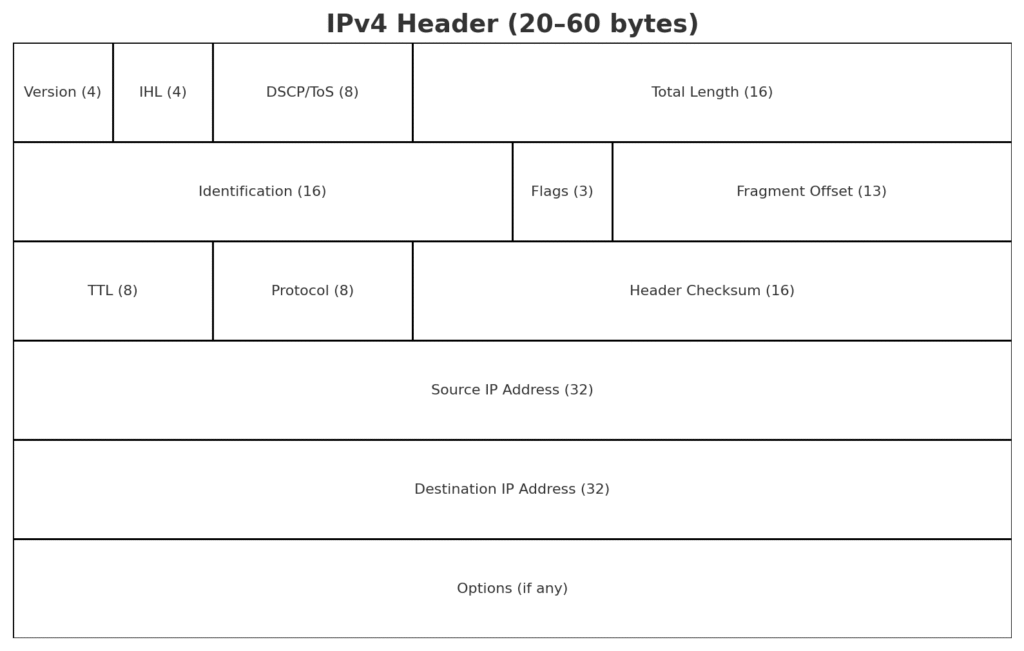
- Version (4 bits): Identifies it as IPv4.
- IHL (Internet Header Length, 4 bits): Tells how long the header is.
- Type of Service / DSCP: Used for Quality of Service (QoS) marking.
- Total Length: Total size of the packet including header + data.
- Identification, Flags, Fragment Offset: Together, these handle fragmentation and reassembly.
- Time To Live (TTL): Limits packet lifetime to prevent loops.
- Protocol: Indicates the next protocol (e.g., 6 for TCP, 17 for UDP, 1 for ICMP).
- Header Checksum: Error detection for the IPv4 header only.
- Source IP Address and Destination IP Address (32 bits each): Logical addressing.
- Options (optional): Rarely used, increases header size up to 60 bytes.
Because IPv4 addresses are 32-bit, there are about 4.3 billion unique addresses, which led to exhaustion.
The IPv6 header, on the other hand, was designed to simplify processing and solve address exhaustion. The header is a fixed 40 bytes and much simpler compared to IPv4.
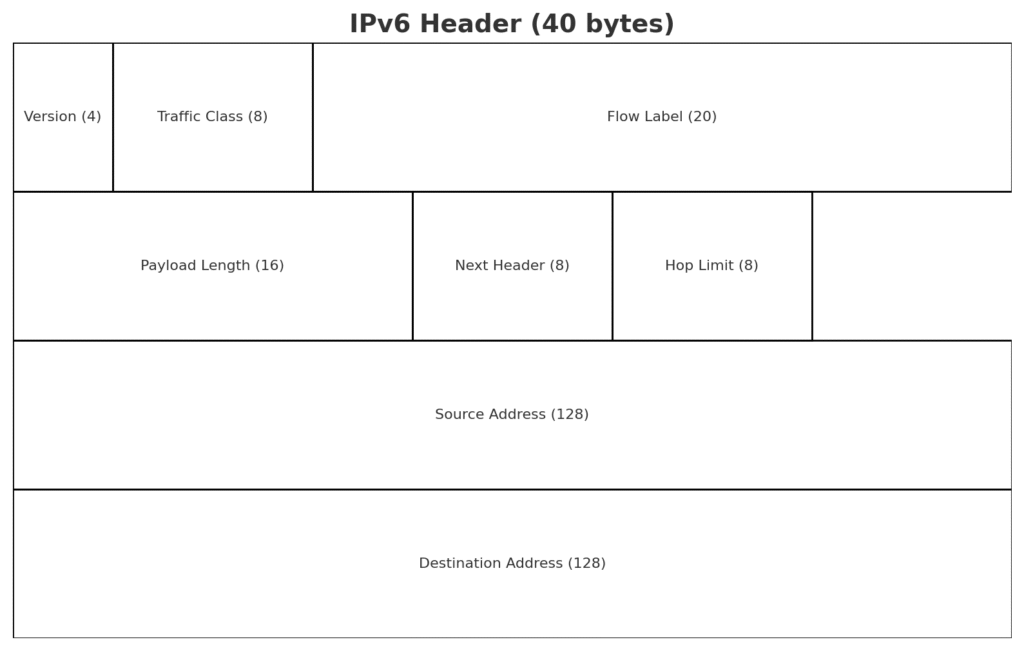
The main fields in IPv6 are:
- Version (4 bits): Identifies it as IPv6.
- Traffic Class (8 bits): Similar to IPv4’s DSCP for QoS.
- Flow Label (20 bits): Allows labeling of packets for special handling (e.g., real-time traffic).
- Payload Length (16 bits): Size of data following the header.
- Next Header (8 bits): Identifies the next header or protocol (TCP, UDP, or an extension header).
- Hop Limit (8 bits): Works like TTL, decremented at each hop.
- Source and Destination IP Address (128 bits each): Allows for an almost unlimited address space.
Unlike IPv4, the IPv6 header does not include:
- Header checksum (to reduce router processing overhead).
- Fragmentation fields (handled only at the source with Path MTU Discovery).
- Options inside the main header (instead, optional data is carried in separate Extension Headers).
Key Differences Interviewers Expect:
- Address space: IPv4 = 32-bit (~4.3 billion), IPv6 = 128-bit (~340 undecillion).
- Header size: IPv4 = variable (20–60 bytes), IPv6 = fixed (40 bytes).
- Checksum: Present in IPv4, removed in IPv6 for efficiency.
- Fragmentation: Done by routers in IPv4; only by the source in IPv6.
- Options: Inside header in IPv4; extension headers in IPv6.
- New fields in IPv6: Flow Label for QoS, larger addresses, simplified header for faster routing.
How I’d deliver in an interview:
“In IPv4 the header is variable length, minimum 20 bytes, with fields like TTL, checksum, identification, and fragmentation. In IPv6 the header is fixed 40 bytes, much simpler, with new fields like Flow Label and much larger 128-bit addresses. IPv6 removes checksum and fragmentation from the header to make processing faster, and options are handled as separate extension headers instead of inside the main header. These design changes make IPv6 more scalable and efficient.”
[…] Network & Security Interview Questions Advanced TCP & UDP Interview Questions and Answers Network Engineer Interview Questions and Answers – 4 Network Engineer Interview Questions and Answers – 3 Network Engineer Interview Questions with […]
[…] Network & Security Interview Questions Advanced TCP & UDP Interview Questions and Answers Network Engineer Interview Questions and Answers – 4 Network Engineer Interview Questions and Answers – 3 Network Engineer Interview Questions with […]